Build an AI system design interviewer with Keyframe and ElevenLabs
Candidates collaborate on a shared surface with a lifelike, interactive AI interviewer that feels like the real thing.
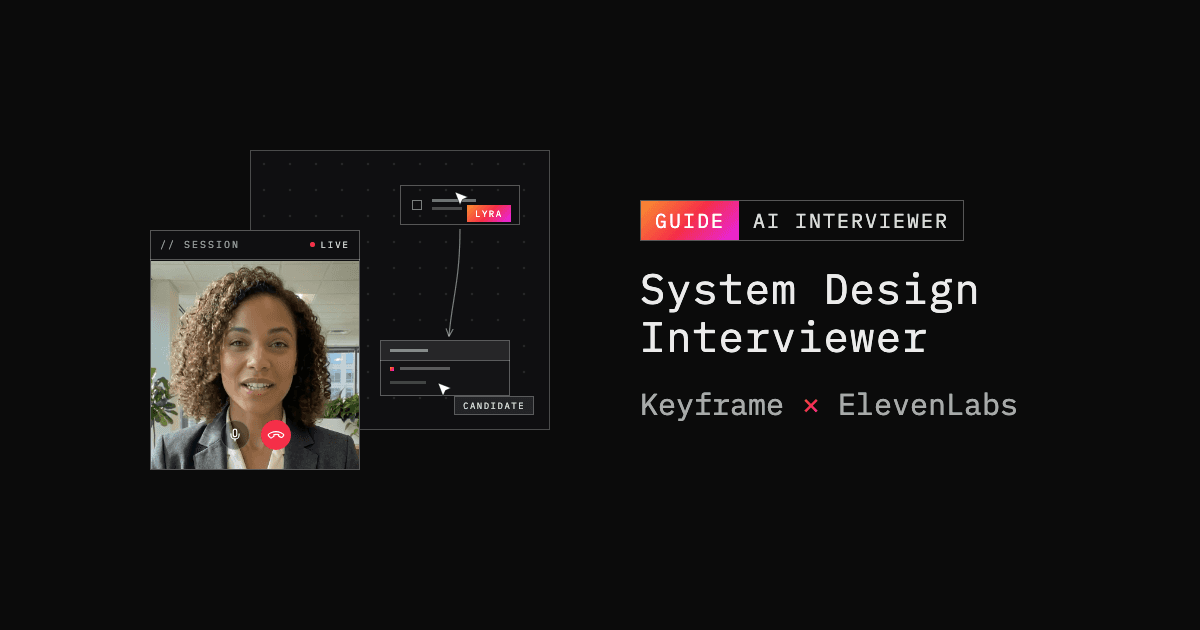
Most of what happens in a system design interview never gets said out loud. The candidate sketches services, databases, and the connections between them while they explain, and the diagram is the answer. An AI interviewer that hears every word but never sees the whiteboard misses the answer.
This post walks through a complete example that solves that. The candidate interviews face to face with Lyra, an interactive, lifelike avatar powered by persona-1.5-live, while designing a system on an infinite canvas. When they add a cache, change a table, or connect two services, Lyra's next question reflects it, with no screenshots, no vision model, and no interruptions.
The stack is small: Keyframe Elements renders Lyra and connects her to the conversation, an ElevenLabs agent runs the interview, React Flow powers the architecture canvas, and a FastAPI backend creates the provider sessions so API keys never reach the browser.
Every code excerpt below is pulled straight from the project so you can follow along in the examples repo.
What we're building
The demo shows six patterns that carry over to any product that puts a Keyframe avatar in front of users:
- FastAPI creates the Keyframe session and the ElevenLabs signed URL in parallel, so only short-lived credentials ever reach the browser.
- A single
PersonaViewobject from@keyframelabs/elementsrenders Lyra, plays her audio and video, and connects her to the ElevenLabs conversation. - A deterministic serializer turns the React Flow diagram into compact text an LLM can work with.
- A sync layer streams canvas snapshots to the agent as background context, deduplicated, rate-limited, and versioned.
- Each interview is a Markdown packet injected per conversation through a dynamic variable, so one shared agent runs all twelve interviews concurrently.
- The ElevenLabs turn-taking settings are tuned for a candidate who goes quiet while drawing: a 15-second turn timeout, normal eagerness, and no interruptions during Lyra's first message.
Here's how the pieces fit together:
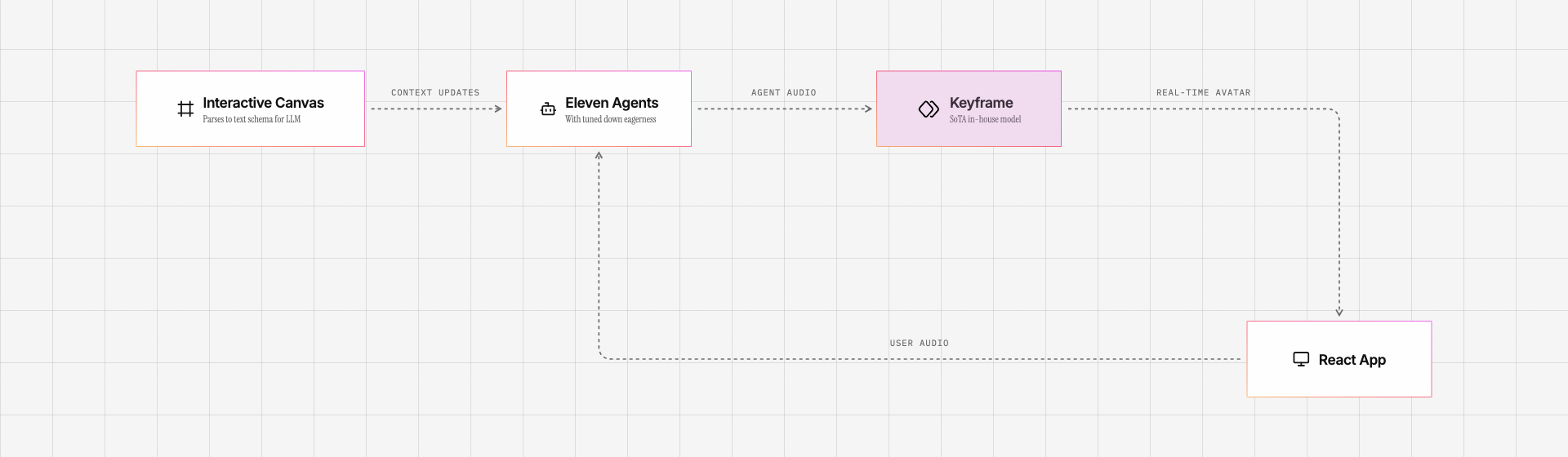
When the candidate clicks Begin interview, the browser requests camera access and asks the backend for a session at the same time. The backend loads the selected interview packet, mints the provider credentials, and returns everything the frontend needs in one response. From there the browser talks directly to Keyframe and ElevenLabs; the backend is out of the loop for the rest of the call. The camera is a local self-view only; Lyra never receives that video.
Prerequisites
- Python 3.12+ and uv
- Node.js and pnpm 11.9.0
- A Keyframe API key
- An ElevenLabs account with a conversational agent
Pattern 1: create the provider sessions on the server
When the frontend asks for a session, FastAPI resolves the selected interview packet, then creates the Keyframe session and requests the ElevenLabs signed URL concurrently:
# server/app/main.py
session_details, signed_url = await asyncio.gather(
    create_keyframe_session(client, keyframe_api_key, settings),
    get_elevenlabs_signed_url(client, elevenlabs_api_key, elevenlabs_agent_id, settings),
)

return LiveSessionResponse(
    session_details=session_details,
    voice_agent_details=VoiceAgentDetails(
        agent_id=elevenlabs_agent_id,
        signed_url=signed_url.signed_url,
        dynamic_variables={INTERVIEW_PACKET_DYNAMIC_VARIABLE: prompt.prompt.strip()},
    ),
)
The browser gets back a participant token and a signed conversation URL, both short-lived; the long-lived KEYFRAME_API_KEY and ELEVENLABS_API_KEY never leave the server process. Creating the Keyframe session is a single POST with an avatar slug, and the response carries the server URL, participant token, and agent identity the browser SDK needs to connect:
# server/app/providers.py
async def create_keyframe_session(
    client: httpx.AsyncClient,
    api_key: str,
    settings: Settings,
) -> KeyframeSessionDetails:
    return await _provider_request(
        client,
        KeyframeSessionDetails,
        "Keyframe session creation failed",
        "POST",
        "https://api.keyframelabs.com/v1/sessions",
        headers={"Authorization": f"Bearer {api_key}", "Content-Type": "application/json"},
        json={"persona_slug": settings.keyframe_persona_slug},
    )
The response model validates the three fields the app relies on and allows extras, so the frontend can forward sessionDetails wholesale to the SDK even as the Keyframe API adds fields:
# server/app/schemas.py
class KeyframeSessionDetails(BaseModel):
    # extra="allow": the frontend forwards sessionDetails wholesale to the avatar SDK.
    model_config = ConfigDict(extra="allow")

    server_url: str
    participant_token: str
    agent_identity: str
Pattern 2: connect the avatar with PersonaView
The frontend constructs a PersonaView from the backend's payload and calls connect(). That is the entire avatar integration:
// frontend/src/components/avatar/useInterviewMediaSession.ts
const view = new PersonaView({
  container,
  sessionDetails: liveSession.sessionDetails,
  voiceAgentDetails: liveSession.voiceAgentDetails,
  dynamicVariables: liveSession.voiceAgentDetails.dynamic_variables,
  videoFit: "cover",
  onStateChange: (status) => {
    // drive the connecting / connected UI
  },
  onDisconnect: () => {
    // distinguish expected hangups from dropped sessions
  },
  onError: (error) => showAvatarError(`Avatar error: ${error.message}`),
});

await view.connect();
PersonaView attaches Lyra's video and audio to the container, joins the Keyframe session, and opens the ElevenLabs conversation over the signed URL, passing the dynamic variables along. There is no WebRTC or media-element plumbing in application code. What's left is cleanup: on hangup the app stops the canvas sync, disconnects the view, and removes the media elements the SDK created:
// frontend/src/components/avatar/useInterviewMediaSession.ts
async function destroyRuntime(runtime: AvatarRuntime): Promise<void> {
  runtime.closeState.expected = true;
  runtime.contextSync.stop();

  try {
    await runtime.view.disconnect();
  } finally {
    runtime.view.videoElement.remove();
    runtime.view.audioElement.remove();
  }
}
Pattern 3: serialize the canvas to text
The canvas is a React Flow editor with services, databases, tables and their fields, free-floating labels, and connections that carry a cardinality. The app could screenshot it and ask a vision model to describe what changed, but that is slow, expensive, and lossy, and the structure already exists as typed data in React state. So the app serializes that data to text.
A TinyURL design in progress becomes:
Canvas v12
Nodes:
service client: Client
service api_gateway: API Gateway
database url_store: URL Store
Tables:
url_mapping(short_code pk, long_url, created_at)
Connections:
client -> api_gateway [1:N]: HTTPS
api_gateway -> url_store [N:1]: read/write
The header is the canvas schema version. Every node gets a stable alias slugified from its label (api_gateway), with _2, _3 suffixes on collisions. Table fields keep their primary-key and foreign-key markers, and connections keep direction, cardinality, and label. Connections can also be drawn field-to-field; wiring a table's id handle to another table's user_id handle serializes as a relationship:
Tables:
users(id pk)
orders(user_id fk)
Connections:
users.id -> orders.user_id [1:N]
The serializer drops coordinates, dimensions, selection, and viewport state. Moving a database box twenty pixels doesn't change the design, so it produces no new text. The rest of the format is equally plain:
// frontend/src/components/canvas/serialize.ts
function serializeField(field: CanvasField): string {
  const tokens = [cleanText(field.text)];
  if (field.primaryKey) tokens.push("pk");
  if (field.foreignKey) tokens.push("fk");
  return tokens.filter(Boolean).join(" ");
}
While the candidate is typing in a label or a field, serialization pauses until the edit completes, so the agent sees url_mapping and never url_ma.
Pattern 4: stream canvas snapshots to the agent
Because the serializer is deterministic, an unchanged canvas produces identical text, and detecting change is a hash comparison. The sync layer samples the latest canvas text every 200 milliseconds, skips snapshots whose FNV-1a hash matches the last send, and sends at most one update per second:
// frontend/src/utils/avatar/canvasContextSync.ts
const HASH_INTERVAL_MS = 200;
const SEND_INTERVAL_MS = 1000;
The sync layer plugs into the avatar through PersonaView.sendContext():
// frontend/src/components/avatar/useInterviewMediaSession.ts
const contextSync = createCanvasContextSync({
  sendContextUpdate: (text) => view.sendContext(text),
  onStatusChange: setCanvasSyncStatus,
});

await view.connect();
contextSync.push(latestCanvasTextRef.current);
contextSync.start();
Each message is a complete snapshot, wrapped in an envelope that tells the model the snapshot supersedes earlier ones and that it should not reply to the update itself:
// frontend/src/utils/avatar/canvasContextSync.ts
return [
  "Current system design canvas state for the interview:",
  `CanvasState update: ${version}`,
  "This is the latest complete canvas snapshot and supersedes earlier canvas state contextual updates.",
  text || "Canvas is empty.",
  "Use this as background context for the next interview turn. Do not react to the update by itself."
].join("\n");
ElevenLabs calls these messages contextual updates: they inform the conversation without prompting a reply. Canvas edits accumulate silently, and Lyra works the newest design into her next question instead of narrating every change.
The sync layer also survives failed sends: only one send is in flight at a time, a newer snapshot replaces an older pending one, and a failed send stays pending so the next one-second tick retries it. The version number advances only on success, so a higher number always means newer state.
Pattern 5: interviews as Markdown packets
The demo ships twelve interviews across three difficulty tiers, from a user profile API at the intern level up to a Kafka-like distributed log at the senior level. Each one is a Markdown file with two lines of front matter:
# server/app/interviews/prompts/tinyurl-system-design.md
---
display_name: TinyURL
skill_level: Junior
---
FastAPI validates and loads every packet at startup, and the session endpoint injects the selected packet's body as the interview_packet dynamic variable you saw in Pattern 1. On the ElevenLabs side, the agent's system prompt is just a wrapper around that variable:
# Selected interview packet

The complete interview packet for this conversation appears inside `<interview_packet>`. Follow that packet as the authoritative interview instructions. Never mention dynamic variables or the packet wrapper to the candidate.

<interview_packet>
{{interview_packet}}
</interview_packet>
Dynamic variables are conversation-scoped, so one shared ElevenLabs agent can run a TinyURL interview and a hotel-booking interview at the same time without the sessions overwriting each other's prompt. The variable's dashboard default is No interview packet was provided. Do not begin an interview., so a misconfigured session declines the interview instead of improvising one.
Each packet also tells Lyra what the canvas updates are and how to use them:
## Canvas context

The candidate is drawing on an infinite canvas using react flow. You receive contextual_update events containing the latest serialized Canvas state.
Treat the newest canvas update as the current architecture diagram and as background for the next natural conversation turn. Compare it with the previous canvas snapshot.
To add an interview, drop a Markdown file into server/app/interviews/prompts/ and restart. pnpm interview:validate checks the front matter and structure before you commit.
Pattern 6: tune turn-taking for long silences
Candidates pause, restart sentences, and go quiet for long stretches while they draw, and an agent tuned for snappy support calls will jump into every gap. The demo's turn-taking settings live in the ElevenLabs dashboard and lean patient: a 15-second turn timeout, normal turn eagerness, and interruptions disabled during Lyra's first message. The packets keep her replies short — acknowledge the answer, then ask one focused question.
If you adapt this demo, test these settings with a real person: ask them to think aloud, go silent while editing a table, correct themselves mid-sentence, and talk over the agent. ElevenLabs documents the relevant controls in its conversation-flow settings.
Using Keyframe with LiveKit Agents
This demo connects Keyframe Elements directly to ElevenLabs and doesn't run a LiveKit Agent. If your voice agent already lives in LiveKit, you don't need to rebuild it to add an avatar. Keyframe ships an official plugin for LiveKit Agents, so your existing AgentSession keeps its STT, LLM, and TTS configuration:
uv add "livekit-agents[keyframe]~=1.5"Set KEYFRAME_API_KEY next to your LiveKit credentials, then start a Keyframe AvatarSession before starting the agent:
from livekit.plugins import keyframe

avatar = keyframe.AvatarSession(
    persona_slug="public:lyra_persona-1.5-live",
)

await avatar.start(session, room=ctx.room)
await session.start(room=ctx.room, agent=interviewer)
Provide exactly one of persona_slug or persona_id. Avatars powered by persona-1.5-live also support programmatic expression changes, which you can call directly or hand to the LLM as a function tool:
await avatar.set_emotion("happy") # "neutral", "happy", "sad", "angry"The Keyframe LiveKit guide and the LiveKit plugin page both walk through the full setup.
Setup
The project lives in the system_design_interview folder of the examples repo:
git clone https://github.com/keyframelabs/examples
cd examples/system_design_interview
cp .env.example .env
Fill in the provider credentials:
KEYFRAME_API_KEY=...
KEYFRAME_PERSONA_SLUG=public:lyra_persona-1.5-live
ELEVENLABS_API_KEY=...
ELEVENLABS_AGENT_ID=...
There are a few one-time things to do in the ElevenLabs dashboard: create a conversational agent, require authentication for it, scope its API key to generating signed URLs, add the interview_packet dynamic variable with the safe placeholder, and paste in the system prompt and turn-taking settings from the README. The app never modifies agent settings at runtime, so this configuration is shared by every session.
Then install and run:
uv sync
pnpm install
pnpm dev
Open http://localhost:5174 (the API runs on http://localhost:8788). Pick TinyURL or another packet and start talking.
Next steps
The demo is intentionally small so it's easy to build on. A few natural directions:
- Write your own interview. Add a Markdown packet with
display_nameandskill_levelfront matter, runpnpm interview:validate, and restart. The avatar and canvas code don't change. - Swap the avatar.
KEYFRAME_PERSONA_SLUGis the only thing that decides who conducts the interview. Browse public avatars on the Keyframe platform. - Point the context channel at your own state. The sync layer takes any string producer. A tutor can follow a worksheet, a support avatar can see the current account state, a training avatar can track a live simulation.
- Move the voice side to LiveKit Agents. If that's your stack, the plugin above drops Lyra into your existing session.
Wrapping up
Lyra follows the candidate's design without a vision model, using a serializer and a sync layer that total a few hundred lines. The avatar integration is even smaller: the backend creates a session with one API call, and the frontend renders her with one PersonaView.
Clone the examples repo, start a TinyURL interview, and add a cache while you answer. Lyra's next question will account for it. When you want the same behavior for your own application's state, serialize.ts and canvasContextSync.ts are the place to start.
Get started with Keyframe
To put a face on your own agent, create a Keyframe API key, browse the public avatars, and read the docs for Elements, the API, and the LiveKit plugin.